For coaches · between-lesson dashboard

Coach the roster without flattening the student.

ARC turns between-lesson range work into a coachable board. See what each student worked on, how it went, what the group is trending toward, and the next cue to send before the next bucket.

SurfaceWeb · responsive
UpdatesEvery session
RosterUp to 30
Student appiPhone XS+
01   Scale

Fifteen students, one useful read.

The board starts with the two questions coaches ask first: what did this student work on at the range, and how did it go? From there, ARC shows who's ready for a cue, which clubs are showing up, and which focus area is repeating across the roster.

  • Range workKnow the session at a glance.Each row names the range block first, then the outcome that matters.
  • Priority queueKnow who to coach next.Highest-signal students rise first, so attention lands where a cue will stick.
  • Coach planSpend attention well.Ready-now students, review-first rows, recent blocks, and club coverage stay visible.
// Roster board coach.arcgolf.ai
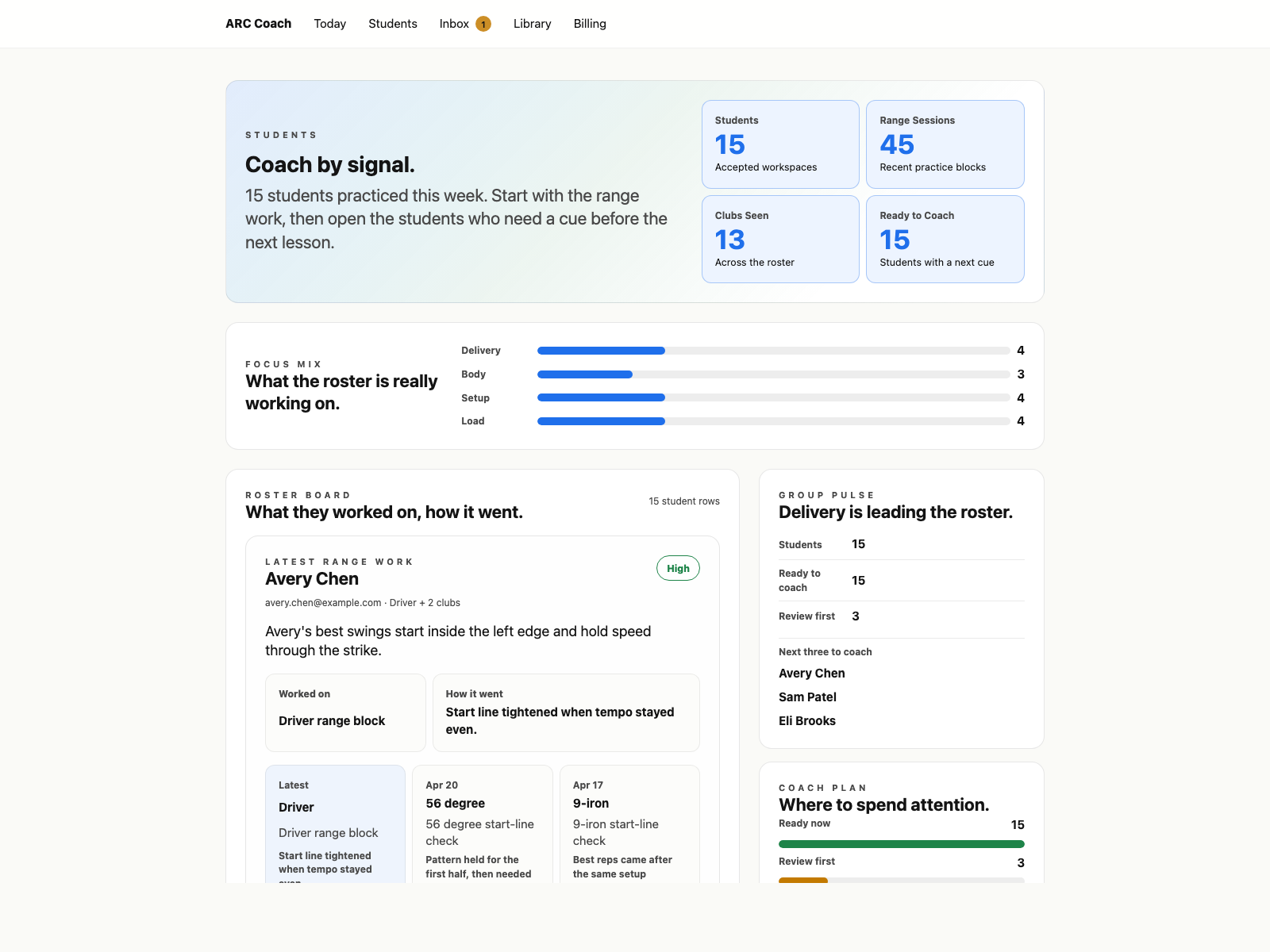
ARC Coach roster board with fifteen students, recent range work, group pulse, coach plan, and priority reads
What it shows Worked-on blocks, outcomes, group trends, and the first few students worth opening — without reading every session packet by hand.
02   Individual

Every student still gets a specific read.

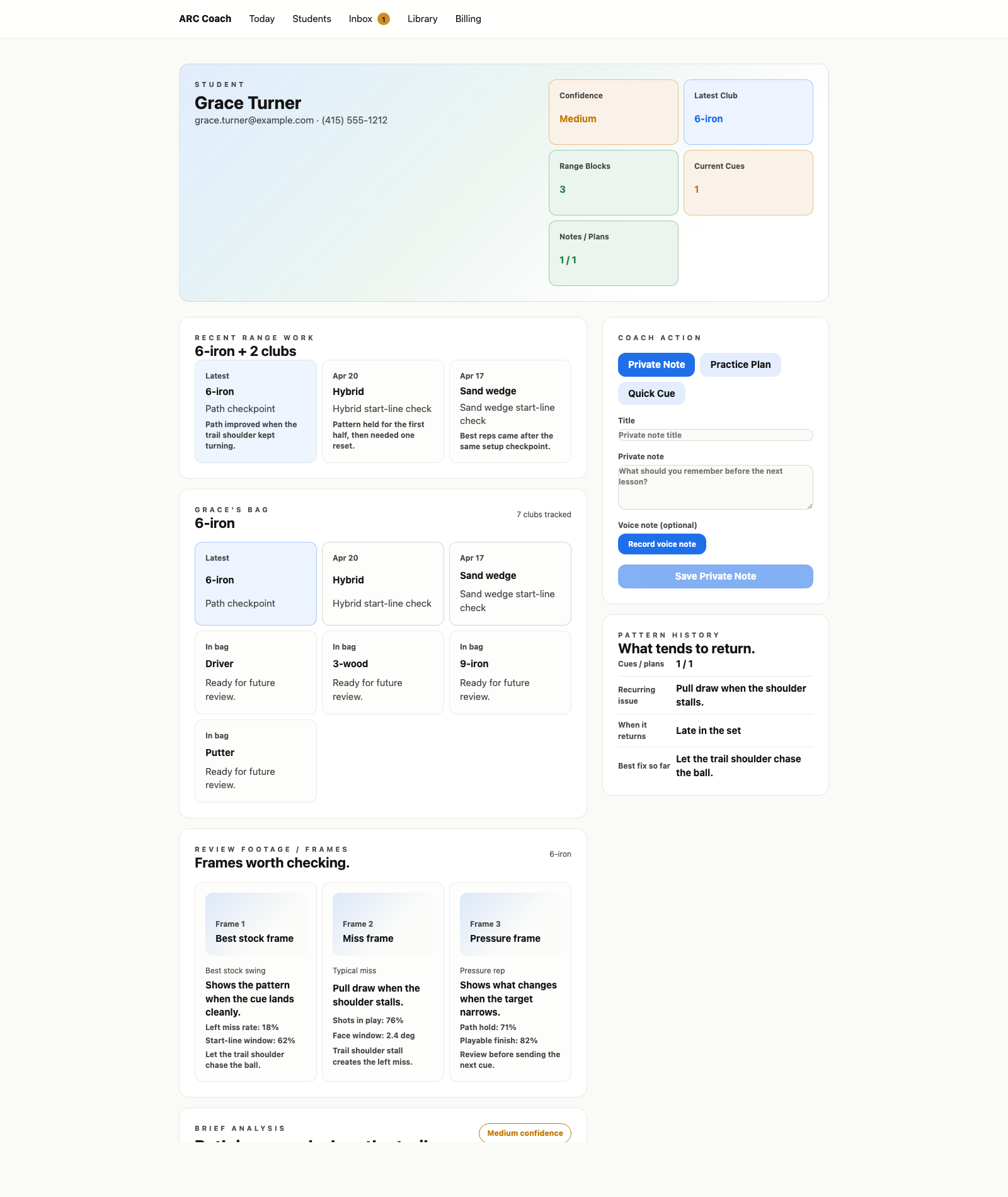
Scale only matters if the individual note stays sharp. ARC keeps the recent clubs, range block, bag, review frames, how it went, do-next cue, measured facts, and pattern history together — so a response can be short, grounded, and useful.

  • EvidenceMeasured before narrative.Facts and provenance sit next to the read so the coach can judge the signal.
  • ActionNote, assign, cue.The handoff ends with work the student can take into the next session.
  • HistoryPatterns stay visible.Recent clubs, returning misses, and the best prior fix sit next to the current cue.
// Student workbench coach.arcgolf.ai/students/:id
ARC Coach student workbench with recent range work, a student bag, footage frames, brief analysis, pattern history, and cue controls
What it shows The actual brief: recent range work, the student's bag, review frames, do-next cue, measured evidence, pattern history, and cue tools.
The handoff

Players show up with the session, not the story.

Instead of "I felt blocky on Saturday," they hand you a tagged session: 23 swings, the pattern that dominated, the metrics that flagged. You spend the lesson coaching, not interviewing.

// Coach handoff

  • Pattern"Tempo got quick on the back nine of the bucket; 7-iron, last 6 swings, all pulled."
  • Proof3 representative clips, side-by-side, with the metric that flagged on each.
  • Note"Tried shorter backswing — release timing improved 8%."
  • NextThe drill or cue you assign comes back to them before the next session.
Coach beta · invite-only

Bring your roster before the next bucket.

The coach dashboard is in private beta. Tell us a little about your roster and we'll get you in.